Newt by Claimbrite
Newt by Claimbrite is an AI-powered mediation platform that helps resolve personal injury claims faster, fairer, and at a fraction of traditional costs.
Main Role
Product Designer
Timeline
Dec 24 - May 25
Project delivered by
Client
overview
For Claimbrite’s AI-driven mediation product, Newt, I led the complete product design process. Starting from a blank slate, I translated early ideas into structured workflows, built wireframes to clarify the core experience, aligned all stakeholders on direction, and iterated on details and edge cases.
To support iteration and close collaboration with engineering, I also set up a clear Figma workflow, creating a smooth path from ideation to developer handoff.
challenges
Designing a seamless mediation flow that clearly differentiated user roles (plaintiff, defendant, mediator) and covered all interaction scenarios.
User Research
Leveraging the existing design system while identifying and improving visually outdated components.
Design System
Identifying and handling edge cases, like AI-human mediator transitions and managing response-waiting states for longer queries.
Edge Cases
Maintaining close design-development collaboration to validate feasibility and keep both sides aligned throughout.
Collaboration
my work
Discovery → Wireframing → Stakeholder Alignment → High Fidelity Designs → Testing & Iteration
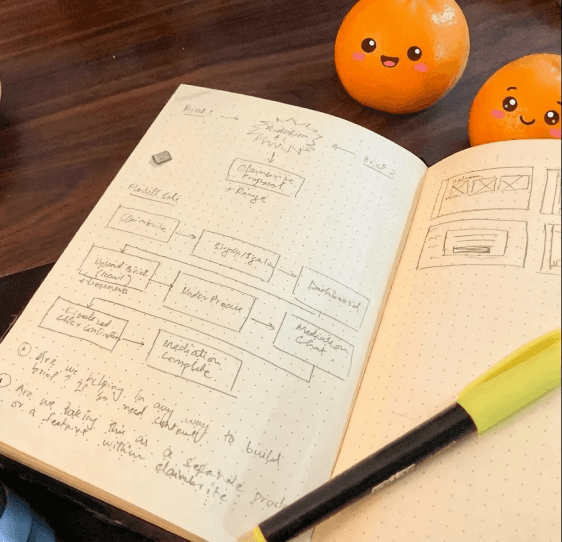
The first step was to understand and structure the core mediation experience. Key user journeys were mapped out across different roles, which helped clarify how plaintiffs, defendants, and mediators (both AI & human) would enter, progress through, and complete a mediation. This early exploration surfaced edge cases and interaction gaps that needed to be addressed before moving forward.
Based on this, wireframes were created to define the main flows and validate direction with stakeholders early. The identified flows included the following:


high-fidelity designs
Once the core flows were locked, the work moved into shaping the final mediation experience. High-fidelity designs focused on making complex, multi-party interactions feel clear and trustworthy, with supporting details like guided prompts, response-waiting states, scheduling, and admin controls refined to fit naturally into the flow.
handling collaboration b/w design & dev
To support iteration and close collaboration with engineering, a clear design workflow was set up in Figma, including structured versioning, review checkpoints, and a “ready-for-dev” state. This ensured design and development could move in parallel while staying aligned.

usability testing & key improvements
To evaluate the effectiveness of the chat interface during an active mediation session, usability testing was conducted across the product, with a strong focus on the chat module where most of the mediation and decision-making takes place. A small glimpse of the usability testing feedback is highlighted below.
Expressed anxiety about saying the "wrong thing" that might escalate the conflict.
Danish
Found the interface too "blank”, didn’t know exactly how to continue conversation
Kevin
User completed the entire sample mediation without getting lost / stuck. Appreciated clutter free UI.
Danish
Difficulty in beginning the mediation, didn’t know where to start the conversation
Abdullah
User typed his response locally before typing in chat to avoid accidental messages.
Abdullah
Pain Point
Positive Feedback
Opportunity
A key issue identified from the usability testing was “blank state paralysis”. When presented with an open text field, users often didn’t know how to continue the conversation. Since users are not professional mediators, high-stress moments led to cognitive overload, making it difficult to frame neutral and constructive responses. As a result, conversations frequently stalled.
proposed & implemented solution
To address this, contextual suggested questions were introduced. A dynamic suggestions bar was added in the sidebar, offering neutral, constructive prompts based on the current state of the conversation, such as after a rejection or a stalled response.
This reduced friction, helped users move the mediation forward, and provided guidance without taking control away from them.

designing for trust in edge cases
One critical edge case I identified during the design process was human-mediator intervention. In scenarios where a human mediator needed to step in due to complexity, escalation, or system limitations, there was initially no clear indication to users or mediating parties that the mediator had changed. This created confusion, broke trust in the mediation flow, and led to uncertainty around response expectations - resulting in a poor user experience at a high-stakes moment.
To address this, I proactively designed a clear visual system that explicitly indicated when control transitioned between the AI mediator and a human mediator. This ensured transparency, preserved user trust, and eliminated guesswork and unnecessary mental overhead.
final designs
from dashboard overview, to mediation details, scheduling, live mediation, and admin oversight!

Dashboard
Mediation cards reflect real-time status, helping users quickly understand progress and next steps.

A centralized view of all case information, participants, and current mediation status.

Scheduler
A custom scheduling flow that aligns availability across parties and reduces coordination friction.

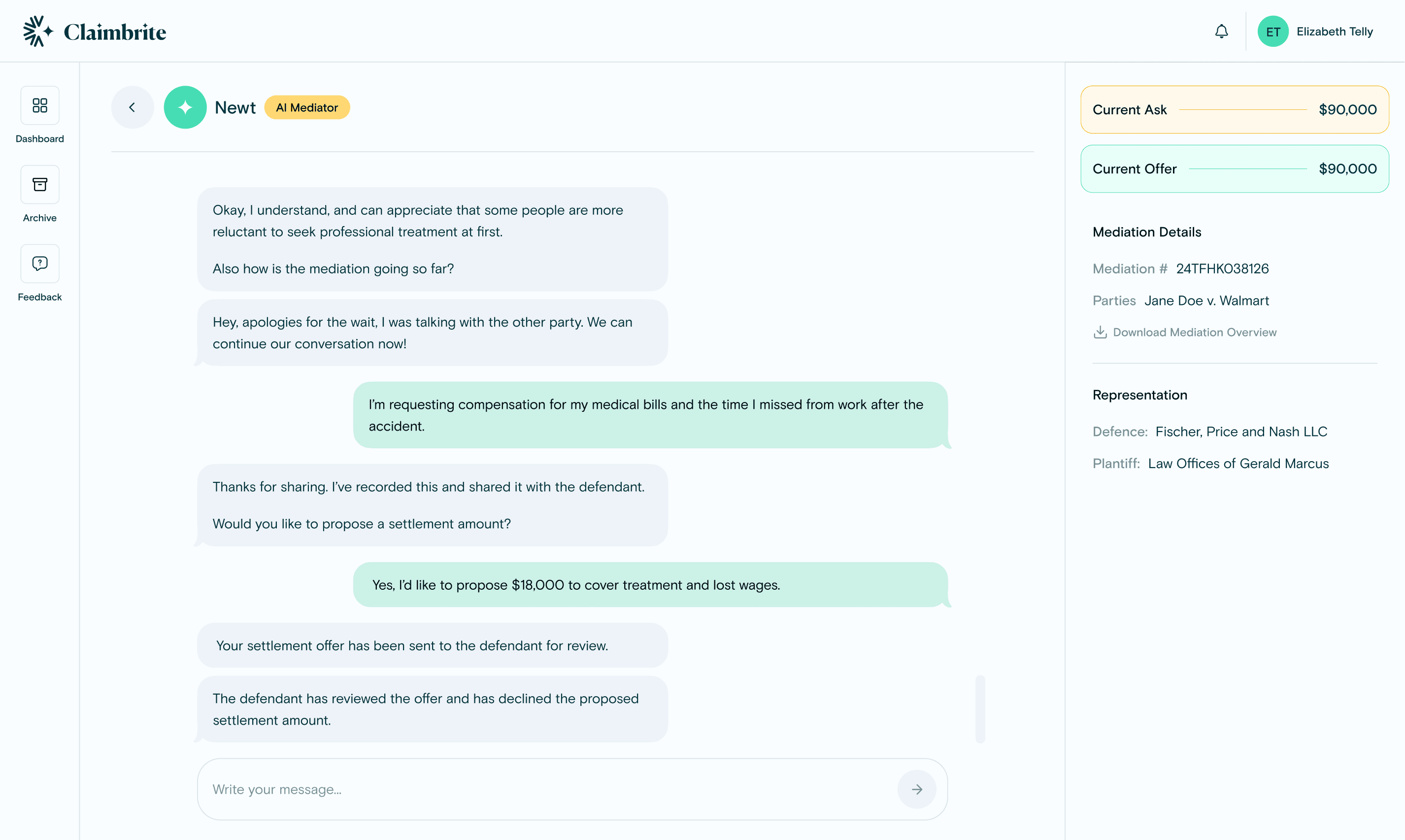
The core interaction space where Newt guides the conversation between plaintiff and defendant, with clear visual cues to differentiate between AI and human mediator responses and communicate handoffs when control shifts.

A dedicated interface for human mediators to monitor sessions and intervene when needed.
results
Delivered the MVP on time with all planned features, plus several new improvements.
Established a well-documented and organized Figma workflow with a proper ideation → design → dev handoff pipeline.
Updated significant portions of the design system, improving consistency and usability without causing blockers for development.
Identified and designed for edge cases like mediator intervention, which strengthened trust and usability of the product.